

The First aid training course organized by the Bulgarian Red Cross office is a mandatory requirement for all new drivers in Bulgaria. All new driving license applicants must complete the course before visiting the Traffic Police office to apply for their license. The duration of the course is 12 hours divided in 2 consecutive days. The course is conducted in Bulgarian language only, but if you ask the staff they will give you an English booklet and also the final test will be in English. (NOTE: The First Aid course is not related to the driving course and can be completed before/after or during the driving course itself).
The following are not required to attend the First Aid course (but they must still visit the Red Cross office to validate their documents):
1. Students of medicine and dentistry who have completed semester studies (upon presentation of a document certified by the university administration);
2. Persons holding a certificate of completion of a First Aid course issued by other national Red Cross/Red Crescent entities and by other institutions abroad with the seal of the Global Center of the IFRC/Red Crescent within the period of validity (five years from its issuance).
Here is a step-by-step guide showing how to schedule your First Aid course:
STEP 1:
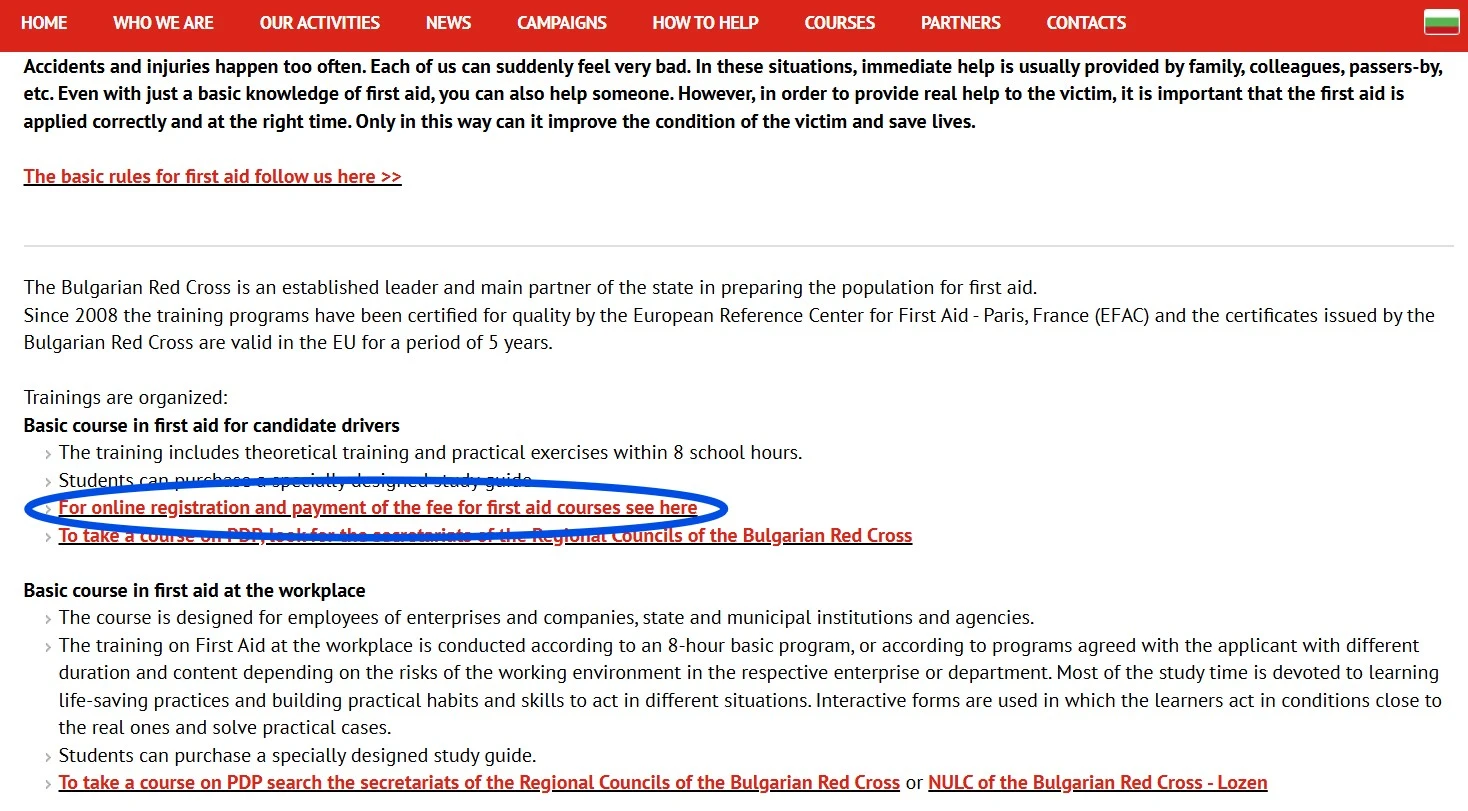
Go to the website of the Red Cross here and click on:
"For online registration and payment of the fee for first aid courses see here"
(in Bulgarian it is: "За онлайн записване и плащане на таксата за курсове по първа долекарска помощ вижте тук"):
Screenshot:
Click Next (the red button at the bottom right part of the page labelled "Напред").
STEP 2:
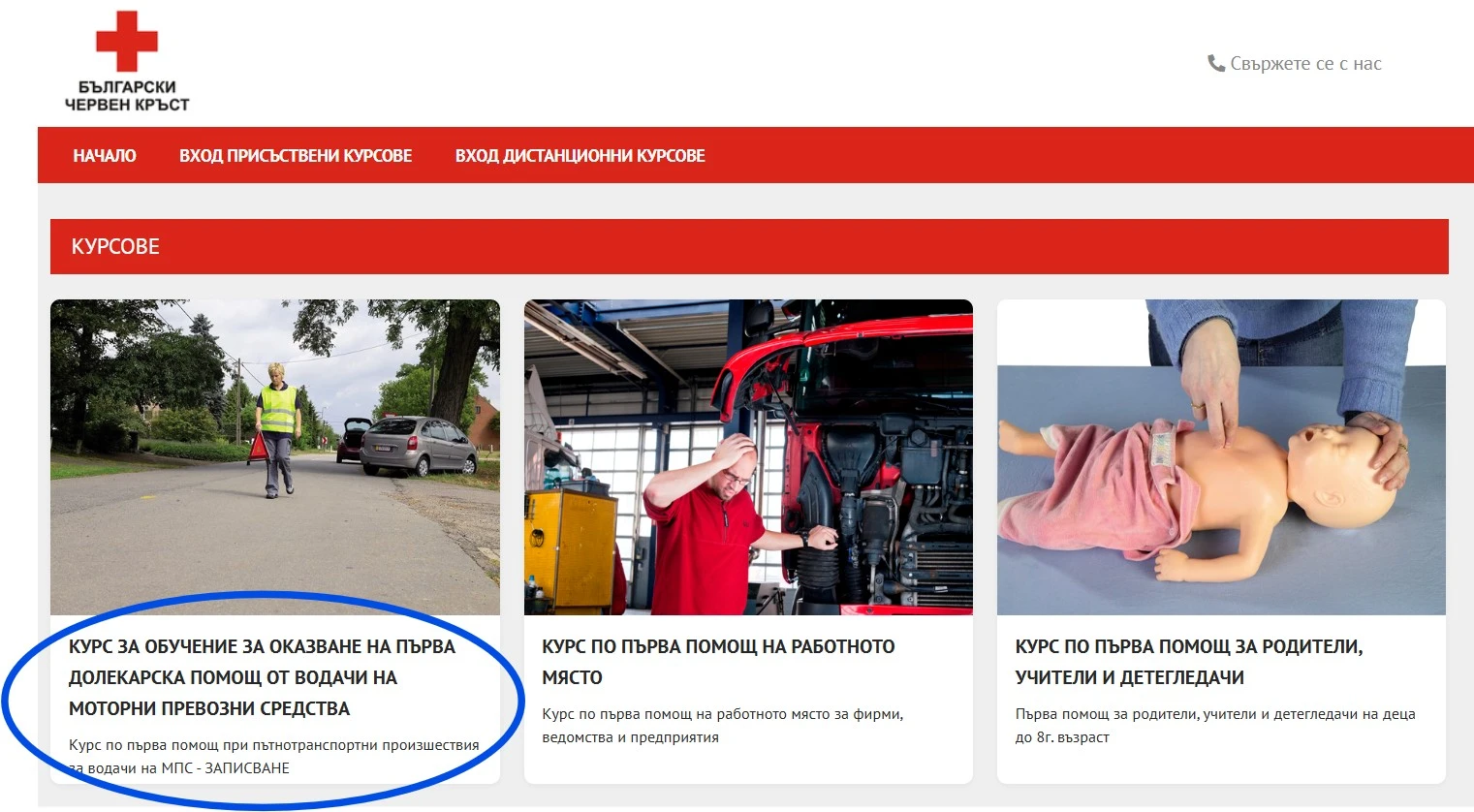
Click on the following course option:
"КУРС ЗА ОБУЧЕНИЕ ЗА ОКАЗВАНЕ НА ПЪРВА ДОЛЕКАРСКА ПОМОЩ ОТ ВОДАЧИ НА МОТОРНИ ПРЕВОЗНИ СРЕДСТВА"
(which means "Training course for providing first aid to motor vehicle drivers"):
Screenshot:
STEP 3:
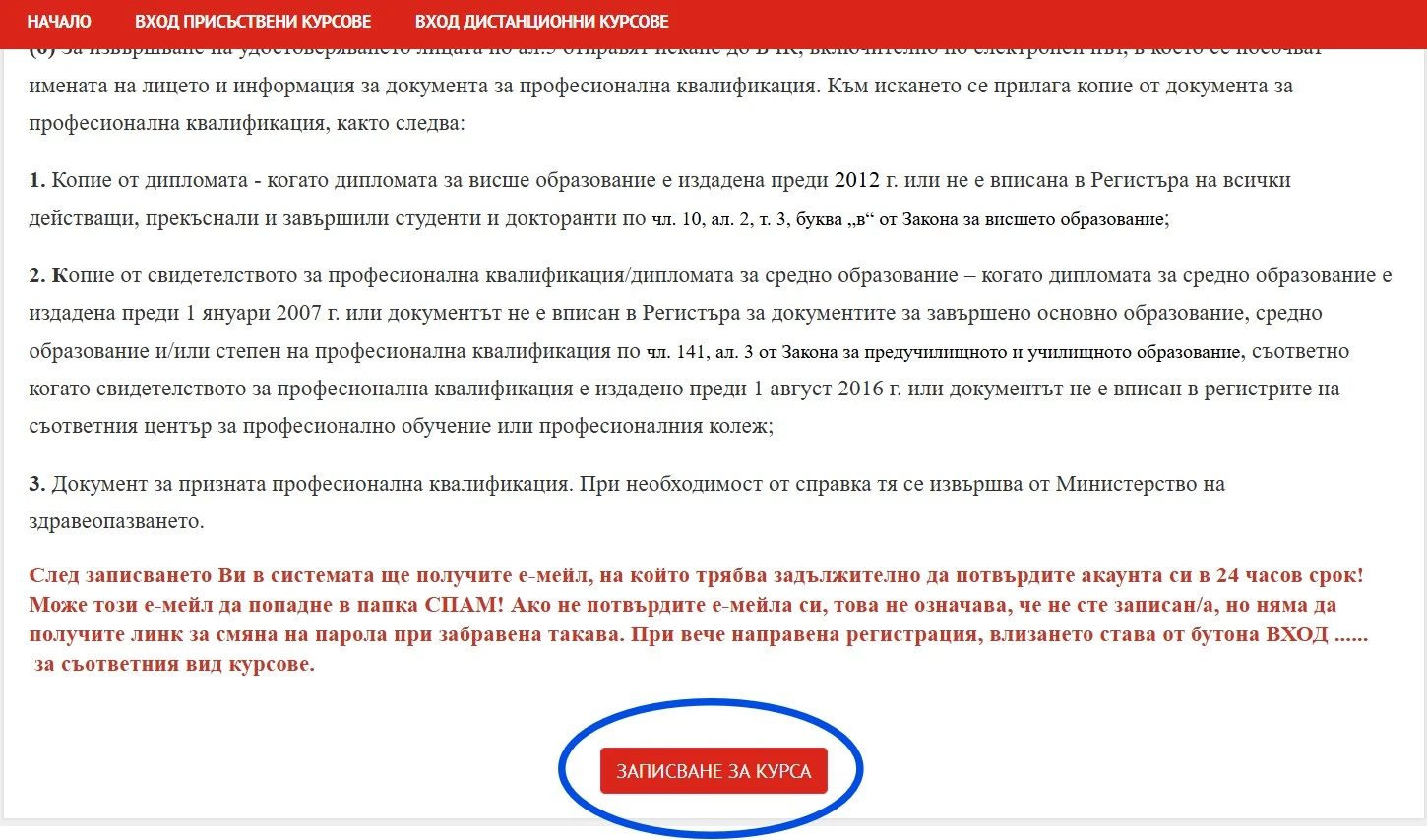
Scroll down to the bottom of the page and click the red button named:
"ЗАПИСВАНЕ ЗА КУРСА" (which means: "COURSE REGISTRATION"):
Screenshot:
STEP 4:
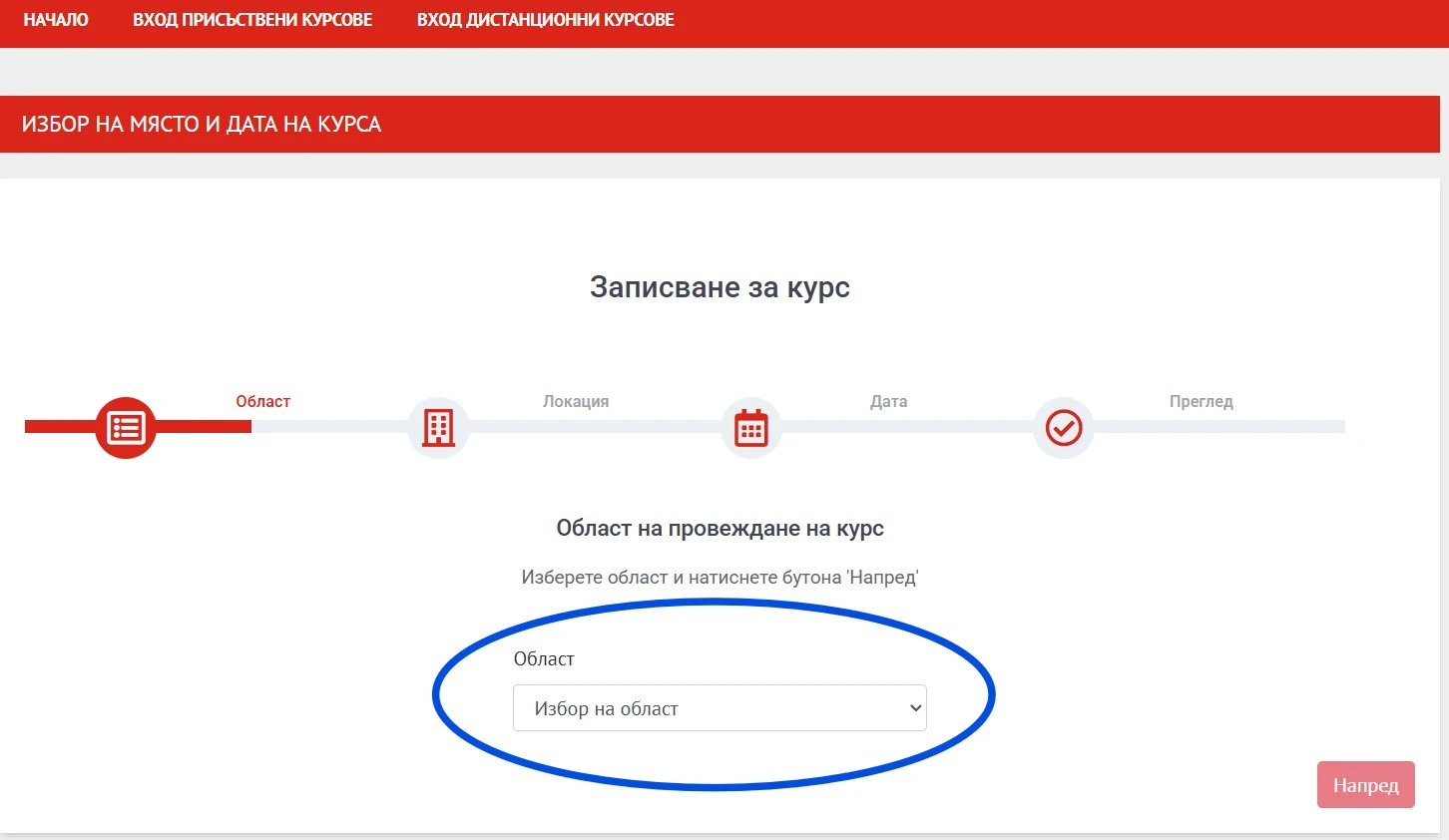
Open the drop-down menu to select the area where you'll sign for the course:
Screenshot:
STEP 5:
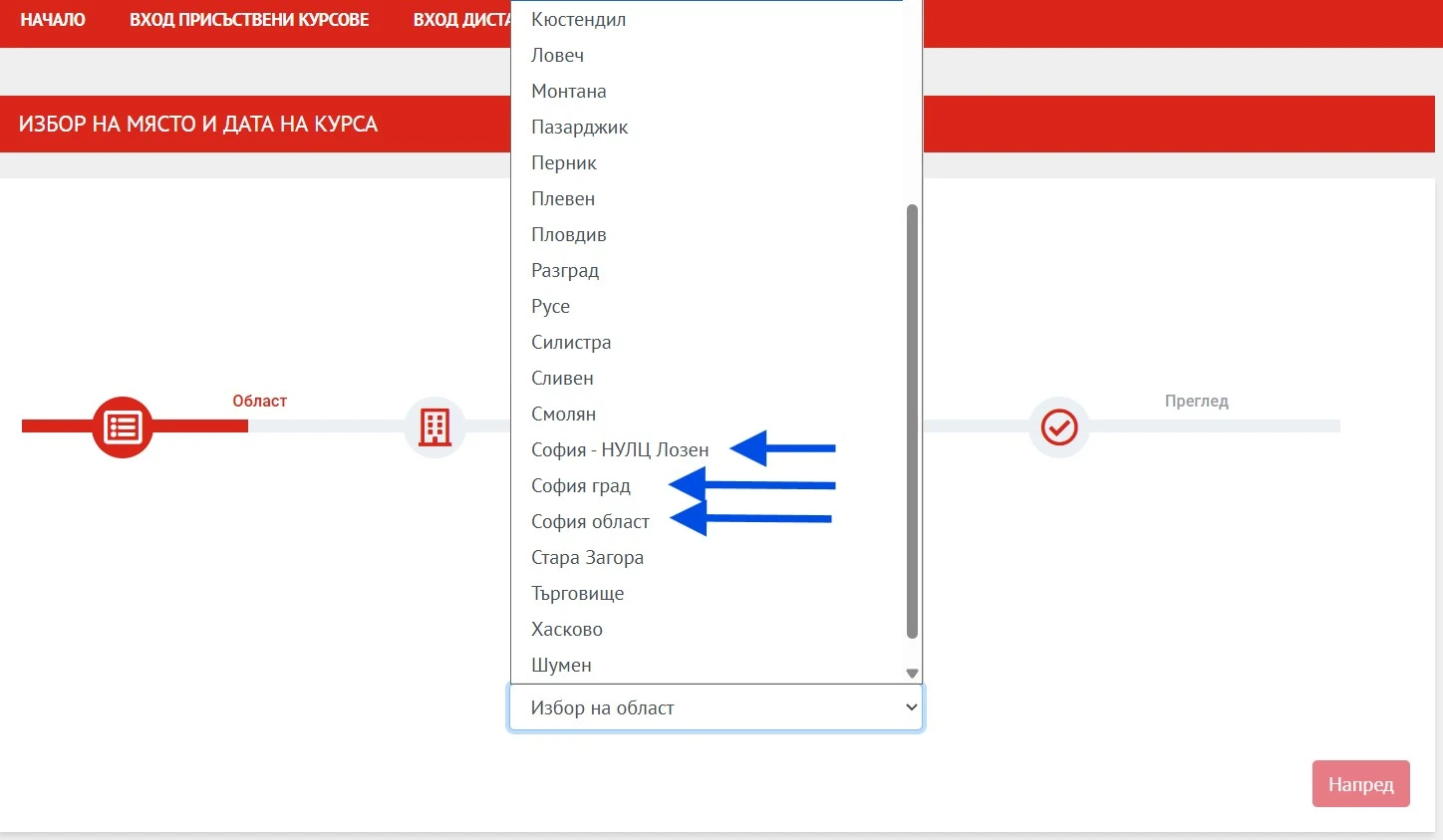
For Sofia there are 3 areas from which you can choose (if there are no available time slots for reservation in one of the areas you might try selecting any of the other 2 areas):
1. Sofia city (in Bulgarian: София град);
2. Sofia region (In Bulgarian: София област);
3. Sofia - NULC Lozen (In Bulgarian: София - НУЛЦ Лозен).
Screenshot:
After you've selected the area, click Next (the red button at the bottom right part of the page labelled "Напред").
STEP 6:
After selecting the area you must select the address at which you'd like to have your course (each area has several different addresses).
NOTE: After selecting an address you will be redirected to a page where you can reserve a date and time for conducting the course. If there no available time slots for reservation at any of the addresses you can go back to the precious page and select a different area (for example: If there are no available time slots for any of the addresses of Sofia city you can go back to the previous page and select Sofia area or Sofia - Lozen).
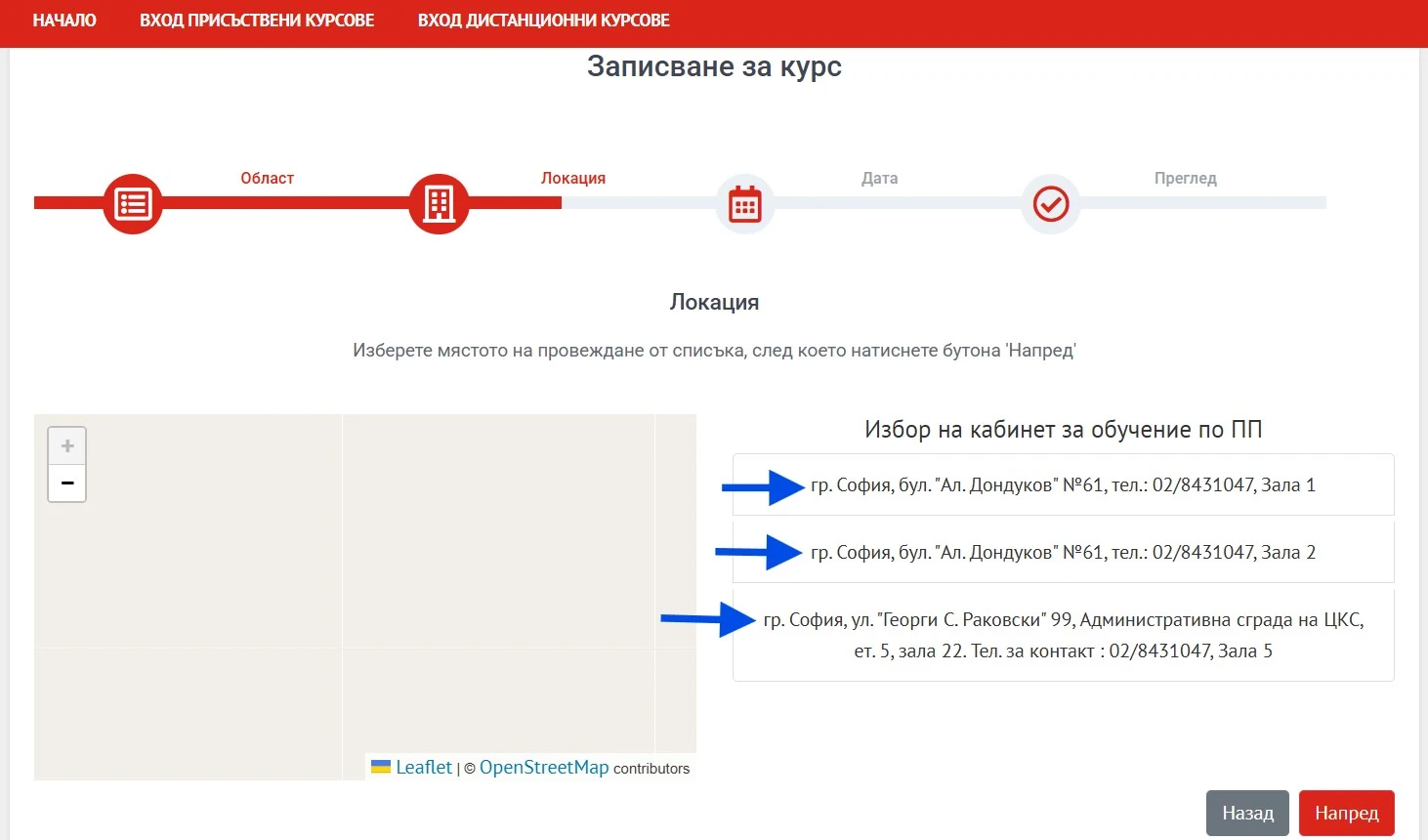
For Sofia city (София град) there are 3 available addresses which you can select:
1. Sofia, 61 Al. Dondukov Blvd., Hall 1, tel.: 02/8431047
(гр. София, бул. "Ал. Дондуков" №61, тел.: 02/8431047, Зала 1)
2. Sofia, 61 "Al. Dondukov" Blvd., tel.: 02/8431047, Hall 2, tel.: 02/8431047
(гр. София, бул. "Ал. Дондуков" №61, тел.: 02/8431047, Зала 2)
3. Sofia, 99 Georgi S. Rakovski St., Administrative Building of the CООP, 5th floor, Hall 5, tel.: 02/8431047
(гр. София, ул. "Георги С. Раковски" 99, Административна сграда на ЦКС, ет. 5, зала 22. Тел. за контакт : 02/8431047, Зала 5)
Screenshot:
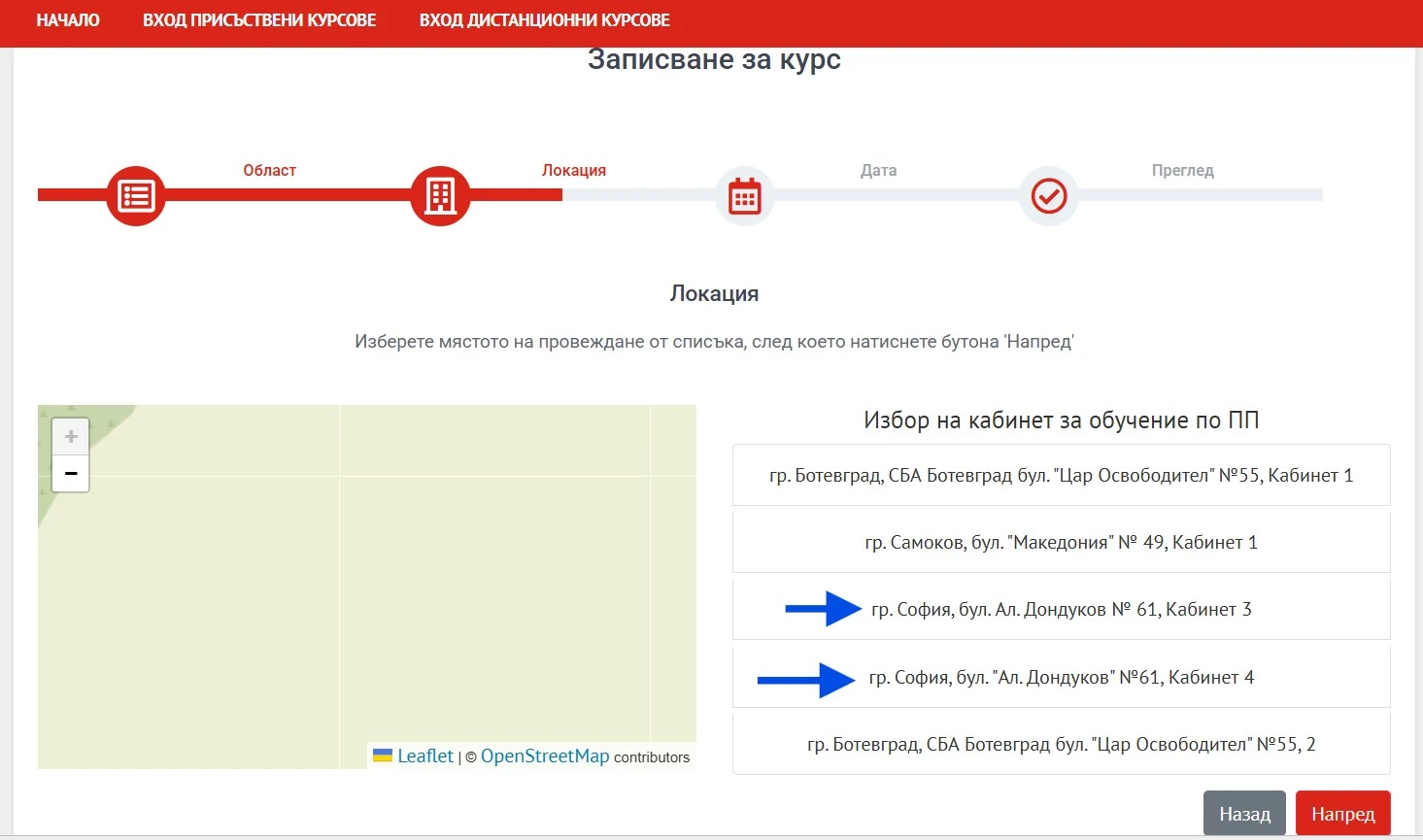
For Sofia area (София област) there are 2 available addresses which you can select (NOTE: The addresses you'll see at the Red Cross website are 5, but only 2 of them are located in Sofia. The other 3 are in Botevgrad and Samokov):
1. Sofia, 61 Al. Dondukov Blvd., Hall 3,
(гр. София, бул. Ал. Дондуков № 61, Кабинет 3)
2. Sofia, 61 Al. Dondukov Blvd., Hall 4,
(гр. София, бул. Ал. Дондуков № 61, Кабинет 4)
Screenshot:
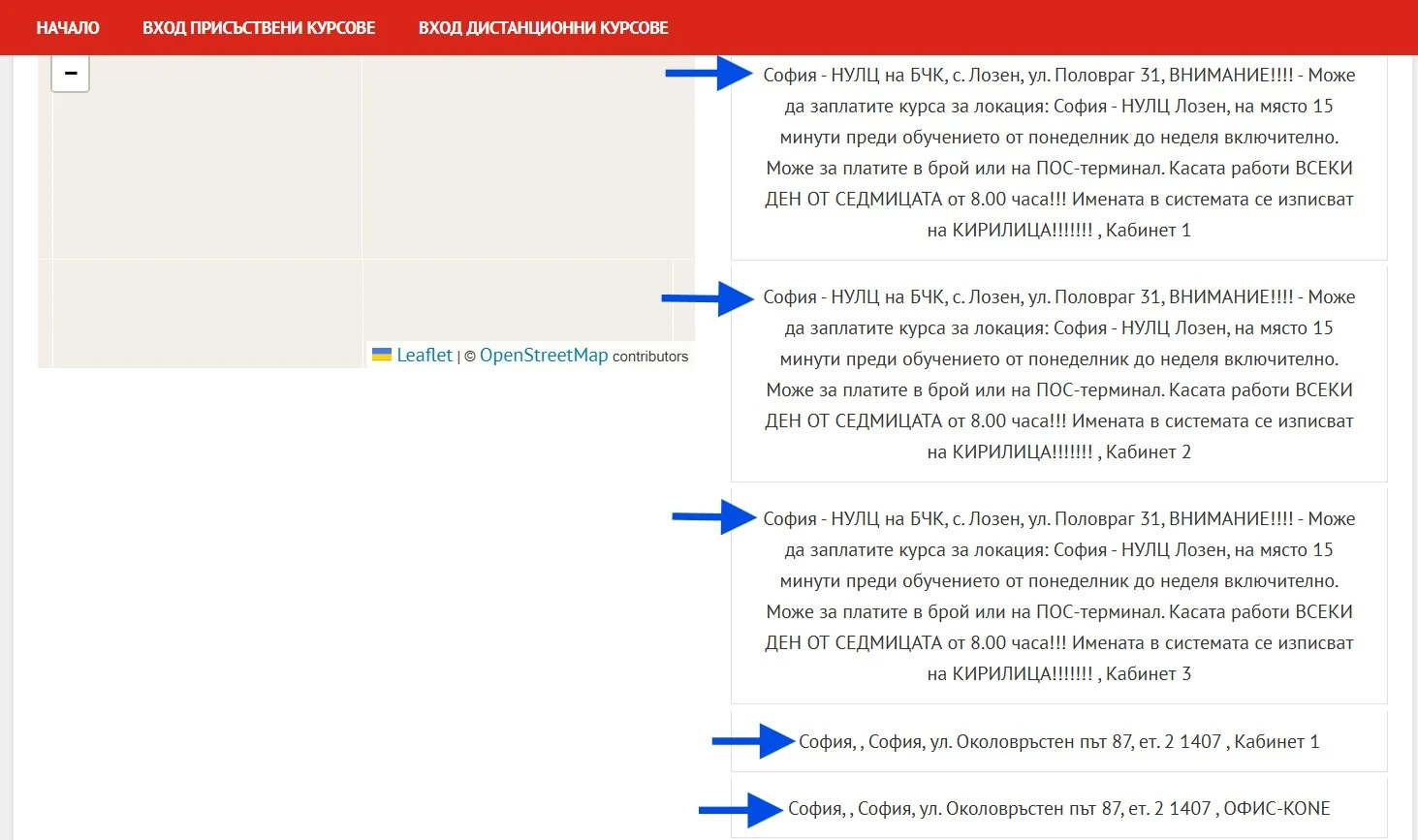
For Sofia - Lozen (София - НУЛЦ Лозен) there are 5 available addresses which you can select (NOTE: The addresses you'll see at the Red Cross website are 6, but only 5 of them are located in Sofia. The 6th one is in the Ravno pole village). You can pay for the course on site 15 minutes before the training from Monday to Sunday inclusive. You can pay in cash or via POS terminal.
1. Sofia - NULC of the Bulgarian Red Cross, village of Lozen, ul. Polovrag 31, Hall 1,
(София - НУЛЦ на БЧК, с. Лозен, ул. Половраг 31, Кабинет 1)
2. Sofia - NULC of the Bulgarian Red Cross, village of Lozen, ul. Polovrag 31, Hall 2,
(София - НУЛЦ на БЧК, с. Лозен, ул. Половраг 31, Кабинет 2)
3. Sofia - NULC of the Bulgarian Red Cross, village of Lozen, ul. Polovrag 31, Hall 3,
(София - НУЛЦ на БЧК, с. Лозен, ул. Половраг 31, Кабинет 3)
4. Sofia, 87 Okolovrasten Pat Str., fl. 2, Hall 1,
(София, ул. Околовръстен път 87, ет. 2, Кабинет 1)
5. Sofia, 87 Okolovrasten Pat Str., fl. 2, OFFICE-KONE,
(София, ул. Околовръстен път 87, ет. 2, ОФИС-KONE)
Screenshot:
After you've selected the address, click Next (the red button at the bottom right part of the page labelled "Напред").
STEP 7:
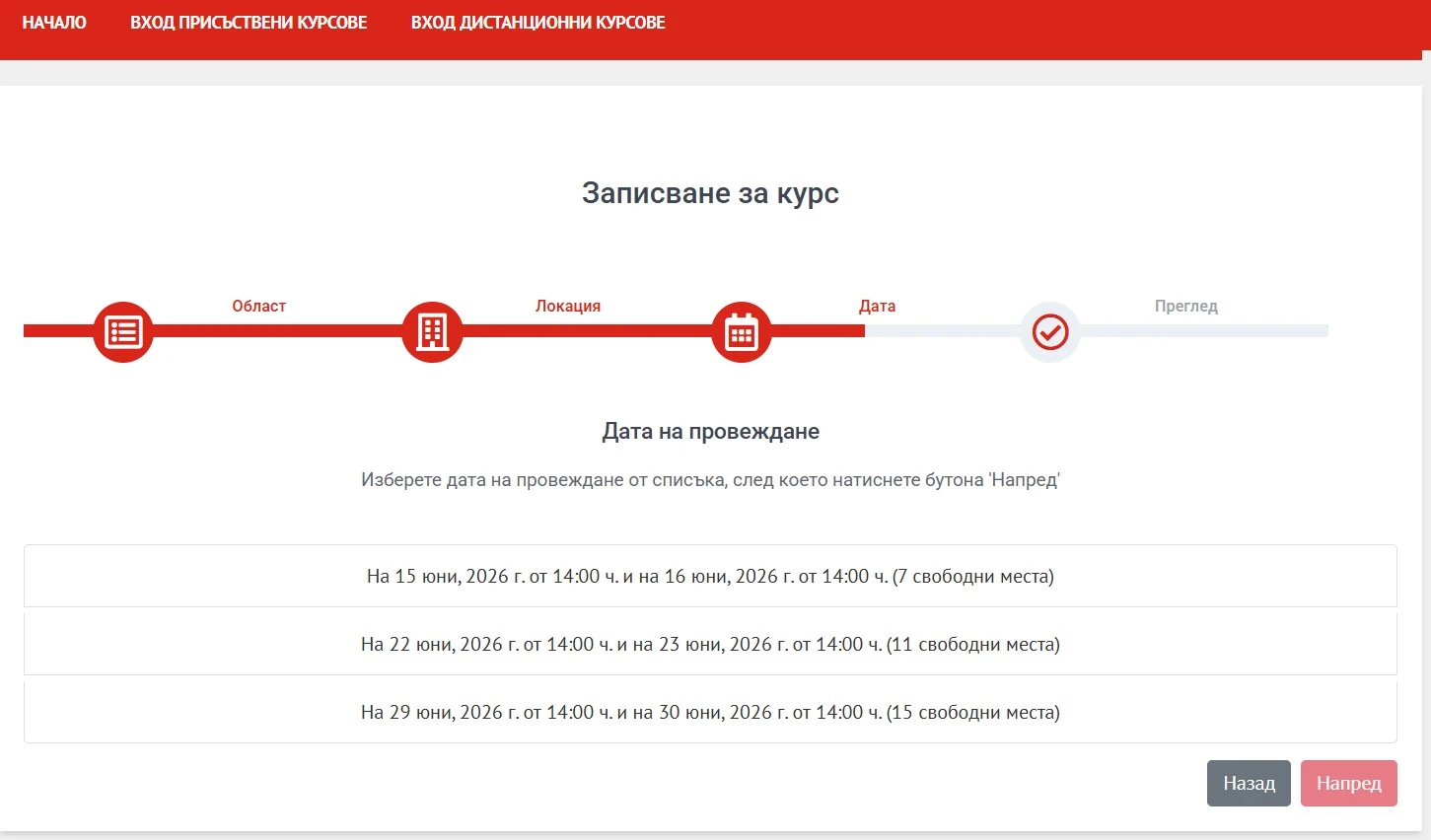
After you've selected the address you must select a time slot for conducting of your First aid course (NOTE: The time slots should be listed as per the screenshot below. If there are NO time slots listed please skip to STEP 8 of this guide).
The time slots are listed in the following format (example):
- June 15, 2026 at 2:00 PM and June 16, 2026 at 2:00 PM (7 places available),
(На 15 юни, 2026 г. от 14:00 ч. и на 16 юни, 2026 г. от 14:00 ч. (7 свободни места)
- June 22, 2026 at 2:00 PM and June 23, 2026 at 2:00 PM (11 places available),
(На 22 юни, 2026 г. от 14:00 ч. и на 23 юни, 2026 г. от 14:00 ч. (11 свободни места)
Screenshot:
After you've selected the time slot, click Next (the red button at the bottom right part of the page labelled "Напред").
STEP 8 (if you've managed to selected a time slot - please skip to STEP 9 of this guide):
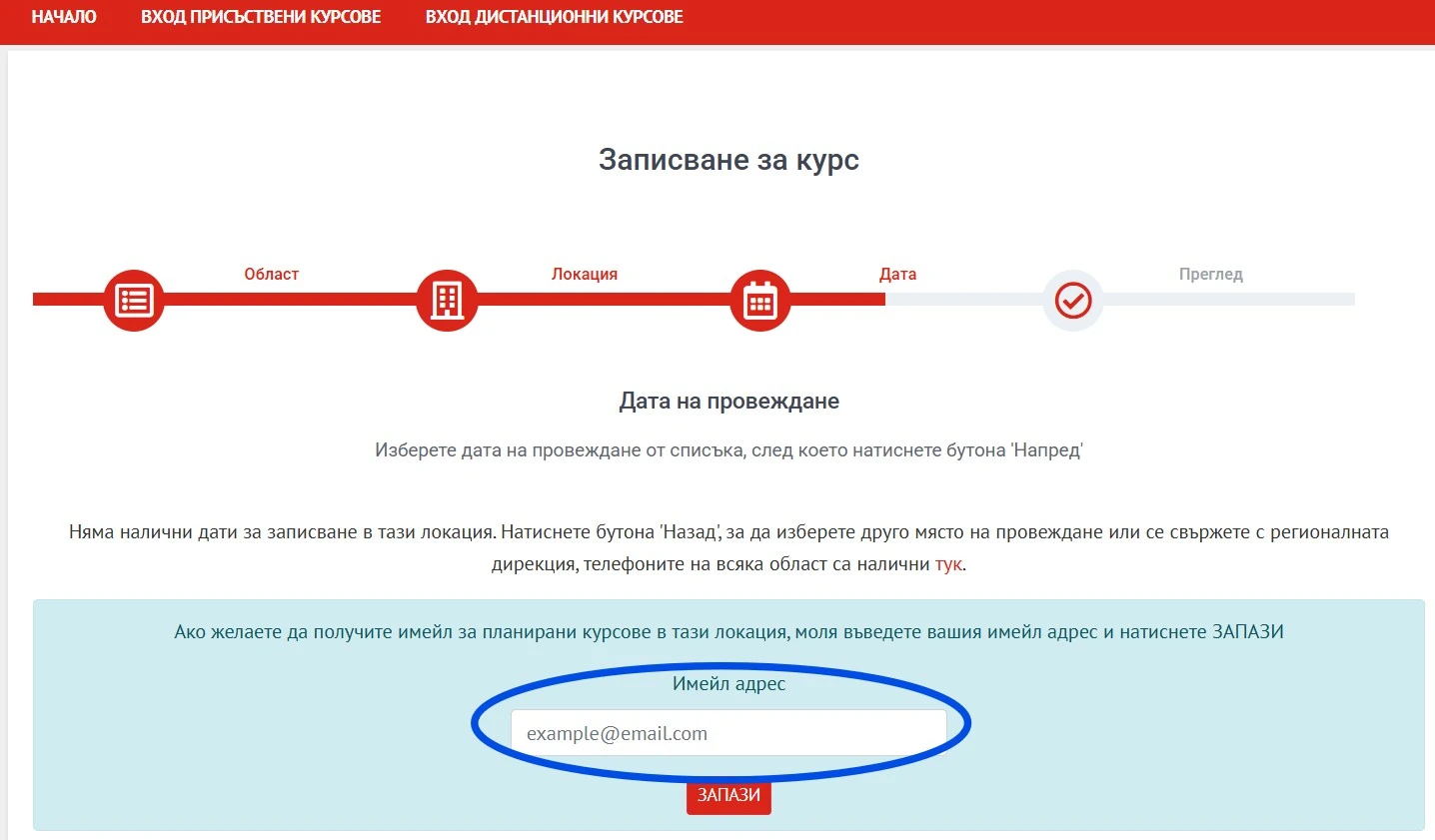
If there is NO list of available time slots you have 2 possible options:
1. Go back to the previous page and select a different address or area;
2. Enter your e-mail address at the "Email address" (in Bulgarian: "Имейл адрес") field located at the bottom of the page and you will receive an email about scheduled courses for the selected location (NOTE: When you receive the email you must go to the Red Cross website and schedule your course IMMEDIATELY as the time slots might be reserved within a few minutes of receiving of the email).
Screenshot:
After you've entered your e-mail address click "SAVE" (the red button at the bottom part of the page labelled "ЗАПАЗИ").
STEP 9:
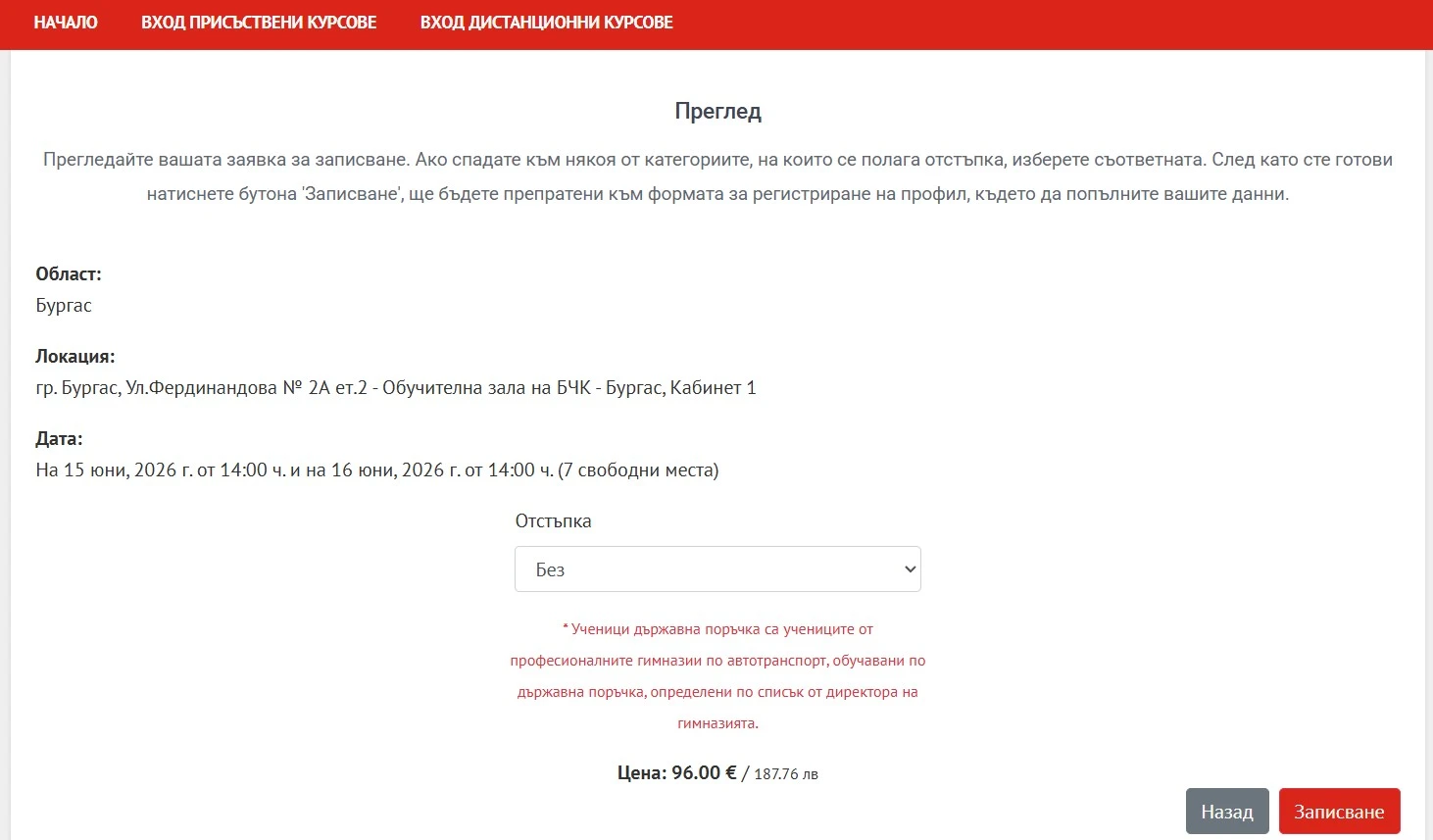
Please check the details of your reservation: area (Област), address (Локация), date and time (Дата) and click "Enroll" (the red button at the bottom right part of the page labelled "Записване").
(NOTE: At the bottom of the page you will also see the current price of the First Aid course).
Screenshot:
STEP 10:
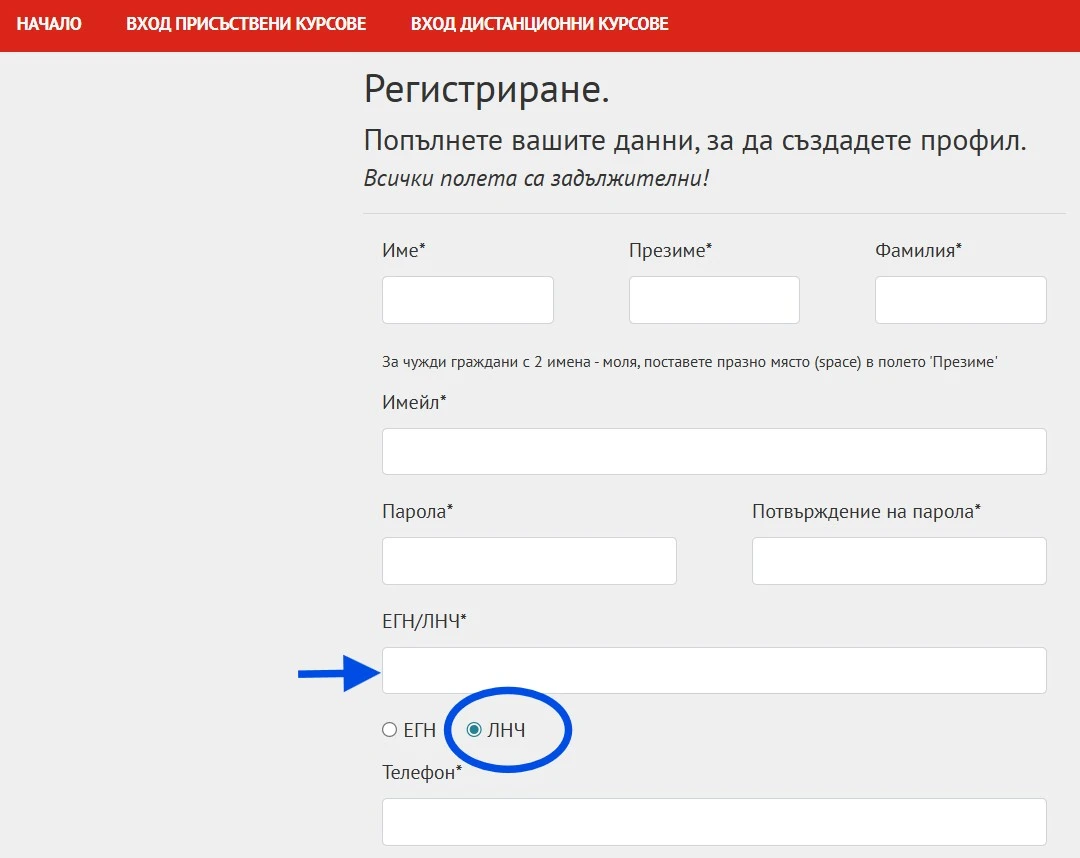
You must fill in your ID card details in order to enroll for the course. Please fill in your ID details in Bulgarian exactly as they are written in your ID card (or residence permit):
- Name (in Bulgarian: "Име");
- Surname (in Bulgarian: "Презиме") - for foreign citizens with 2 names please put a space in the "Surname" field;
- Family name (in Bulgarian: "Фамилия");
- E-mail address (in Bulgarian: "Имейл");
- Password and Password confirmation (in Bulgarian: "Парола" and "Потвърждение на парола");
- ID number (in Bulgarian: "ЕГН/ЛНЧ").
NOTE: Just below the ID number field you must select the type of your ID number (EGN/ЕГН or LNC/ЛНЧ). Usually foreign citizens have an ID number of the LNC type and it typically starts with 100. Please select the correct ID number type otherwise the system will not accept your registration (check the first screenshot below).
- Phone number (in Bulgarian: "Телефон");
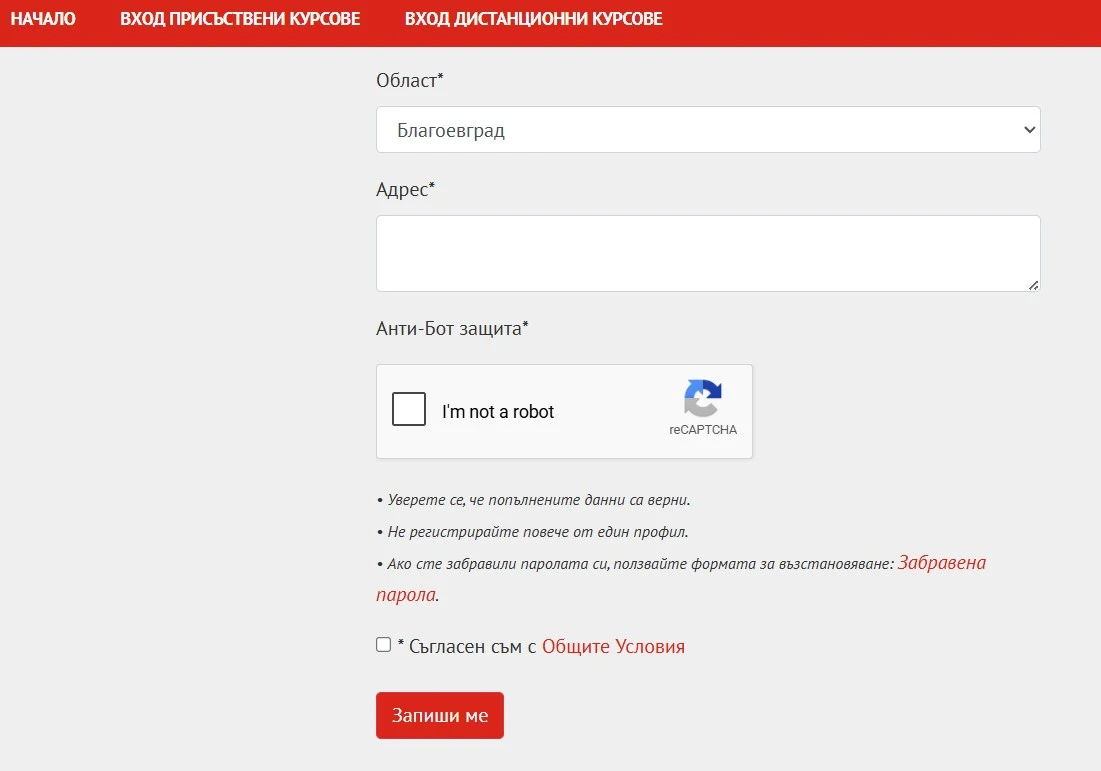
- Area (in Bulgarian "Област");
- Address (in Bulgarian: "Адрес").
Select the 2 remaining checkboxes ("I'm not a robot" and "I agree with General Terms and Conditions/Съгласен съм с Общите Условия") and click "Enroll" (the red button at the bottom part of the page labelled "Записване").
Once you enroll for the course you will receive instrutions for payment (there are various options like payment with card or on site).
Screenshot 1:
Screenshot 2: